10.5Delivery Support
Set the delivery charge for every district, add zones with their own charges, add weight-based extra charges, and decide whether cash on delivery and the free-delivery threshold apply.
- Menu:
- Manage Shop
- Who:
- Owner · Manager
- Package:
- All packages
- Updated:
- 2026-10-15
Overview
Delivery Support is where you set what buyers pay for delivery. This is the only place delivery charges are edited. The Courier page is for parcels and courier accounts, and it links here.
The page works like this. At checkout, the buyer's district picks a zone. A district belongs to only one zone. The zone's charge is added to the order total as Shipping, and it shows in the order summary, on the order-success page and on your dashboard. A district that no zone claims uses the Default delivery charge.
Owners and Managers can change these settings. Staff are sent to the dashboard.
Screen tour
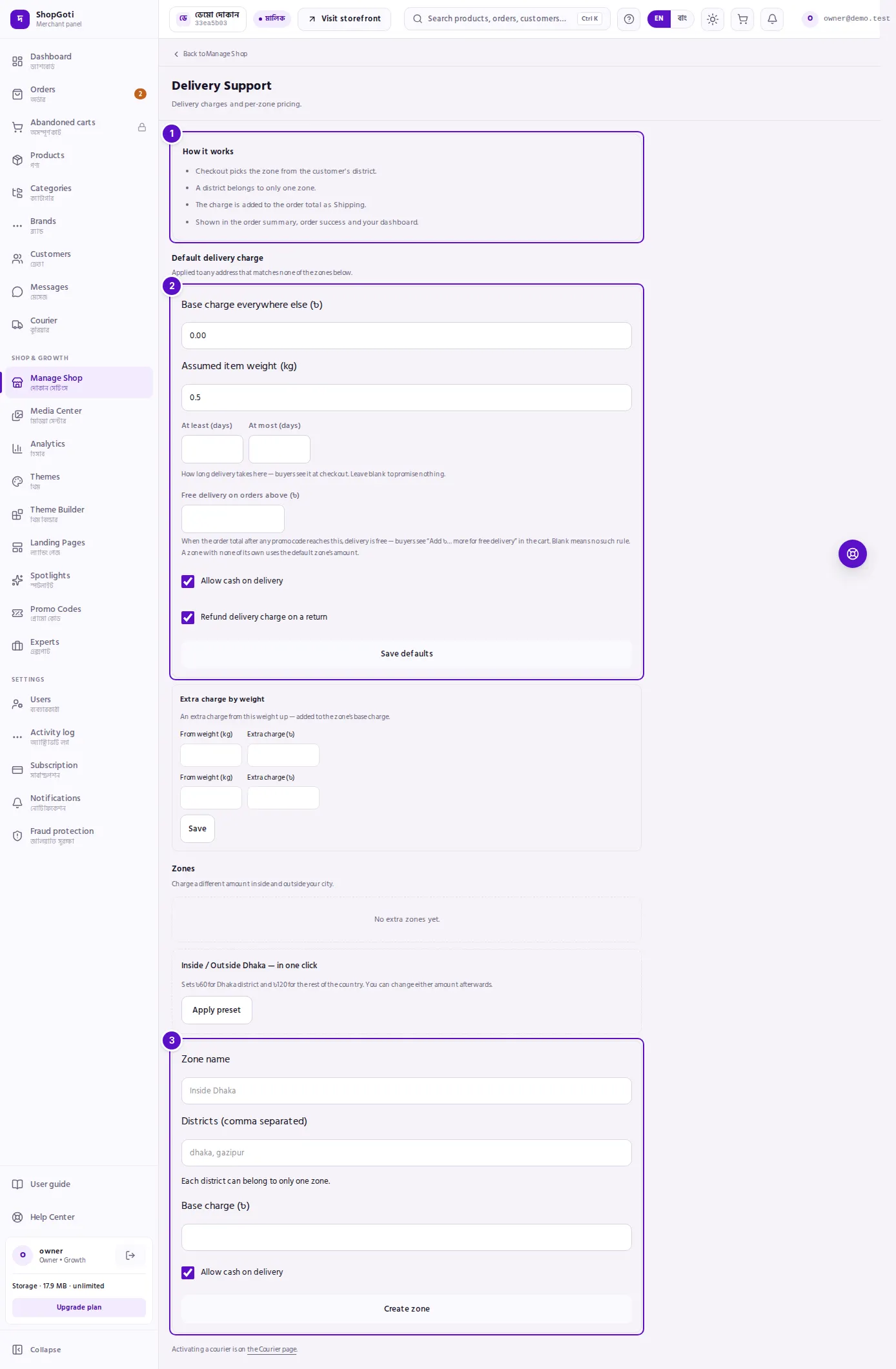
- How it works — four short rules: how checkout picks a zone, that a district belongs to one zone only, how the charge is added, and where it appears.
- Default delivery charge — the charge for every district no zone claims, with its own weight tiers below. The default zone cannot be renamed or deleted.
- Create a zone — the form at the bottom of the Zones section, for a city or area with its own charge.
Steps
Set the default delivery charge
Steps
- Under Default delivery charge, type Base charge everywhere else (৳).
- Optional: type Assumed item weight (kg), the weight the shop assumes for one item.
- Optional: type At least (days) and At most (days). Buyers see this estimate at checkout. Leave both blank to show no estimate.
- Optional: type Free delivery on orders above (৳). Leave it blank for no free-delivery rule.
- Tick or untick Allow cash on delivery and Refund delivery charge on a return.
- Press Save defaults.
Add extra charges by weight
Each zone, and the default zone, has a box called Extra charge by weight.
Steps
- In From weight (kg), type the weight where the extra charge starts.
- In Extra charge (৳), type the amount added on top of the zone's base charge from that weight up.
- Use a spare row for another weight level. Blank rows are ignored.
- Press Save.
Apply the one-click Dhaka preset
The preset button appears only while you have no zone other than the default.
Steps
- Under Zones, find Inside / Outside Dhaka — in one click.
- Press Apply preset.
- The panel creates a zone called Inside Dhaka for the district Dhaka at ৳60, and sets the default charge to ৳120 for the rest of the country.
You can change either amount afterwards. If a zone for Dhaka already exists, the preset does nothing and says so.
Add a zone for a city or area
Steps
- Scroll to the form at the bottom of Zones.
- In Zone name, type a name such as Inside Dhaka.
- In Districts (comma separated), type the districts, for example
dhaka, gazipur. - In Base charge (৳), type the amount.
- Leave Allow cash on delivery ticked, or untick it for this zone.
- Press Create zone.
A district can be in only one zone. If a district is already in another zone, the save is refused.
Edit or delete a zone
Steps
- In the zone's card, change any field: Zone name, Districts (comma separated), Delivery charge (৳), Cash on delivery stays on, At least (days), At most (days) or Free delivery on orders above (৳). A blank name, district list or charge keeps the current value.
- Press Save zone.
- To remove a zone, press Delete in its card.
The default zone shows Default — cannot be removed in place of the Delete button.
Fields
Default delivery charge
| Field | Required | What it does |
|---|---|---|
| Base charge everywhere else (৳) | No | The charge for every district no zone claims. |
| Assumed item weight (kg) | No | The weight the shop assumes for one item. Minimum 0.001 kg. |
| At least (days), At most (days) | No | The delivery estimate buyers see at checkout. Between 1 and 365 days. Blank shows no estimate. |
| Free delivery on orders above (৳) | No | Delivery is free when the order total after any promo code reaches this amount. Blank means no rule. |
| Allow cash on delivery | No | Tick to offer cash on delivery to addresses in this zone. |
| Refund delivery charge on a return | No | Tick to refund the delivery charge when an order is returned. |
Zones
| Field | Required | What it does |
|---|---|---|
| Zone name | Yes, when you create a zone | The name of the zone. |
| Districts (comma separated) | Yes, when you create a zone | The districts in the zone, separated by commas. Each district belongs to one zone only. |
| Base charge (৳) | Yes, when you create a zone | The zone's delivery charge. |
| Allow cash on delivery | No | Tick to offer cash on delivery in this zone. It is ticked when you create a zone. |
| At least / At most (days), Free delivery above (৳) | No | The same as for the default zone. |
Extra charge by weight
| Field | What it does |
|---|---|
| From weight (kg) | The weight where the extra charge starts. |
| Extra charge (৳) | The amount added on top of the zone's base charge. |
Tips and common mistakes
- Extra charges add to the base charge. A weight tier does not replace the zone's charge. It adds to it, from its weight up.
- Blank can mean keep or clear. In a zone's edit form, a blank name, district list or charge keeps the current value. A blank Free delivery above clears the rule. A blank delivery estimate shows nothing to buyers.
- Two zones cannot share a district. If you want a district in a new zone, remove it from the old one first.
- Check the default before you add zones. Every district that no zone claims uses the default charge, which for most shops is the rest of the country.
- Courier activation is elsewhere. To switch on a courier, use the Courier page. This page has a link to it at the bottom.
Related pages
- Payment Gateway — cash on delivery and the other payment methods
- Shop Policy — the return policy buyers read
- Manage Shop hub