24.1Help Center
Search the common questions, watch the tutorials, message us on WhatsApp, and open the full user guide from the Help Center.
- Menu:
- Help Center
- Who:
- Owner · Manager · Staff
- Package:
- All packages
- Updated:
- 2026-10-15
Overview
The Help Center is the help area inside the panel. Three things happen here: you search the common questions, watch tutorial videos, and message us on WhatsApp directly. The card at the top opens the full user guide in a new tab. The guide covers every menu and feature, step by step, with screenshots.
On a computer, the left menu has a Help Center link at its foot, and a round floating button sits at the bottom right. Both open this page in a new tab, so the screen you were on stays open. Owners, Managers and Staff can all open this page.
Screen tour
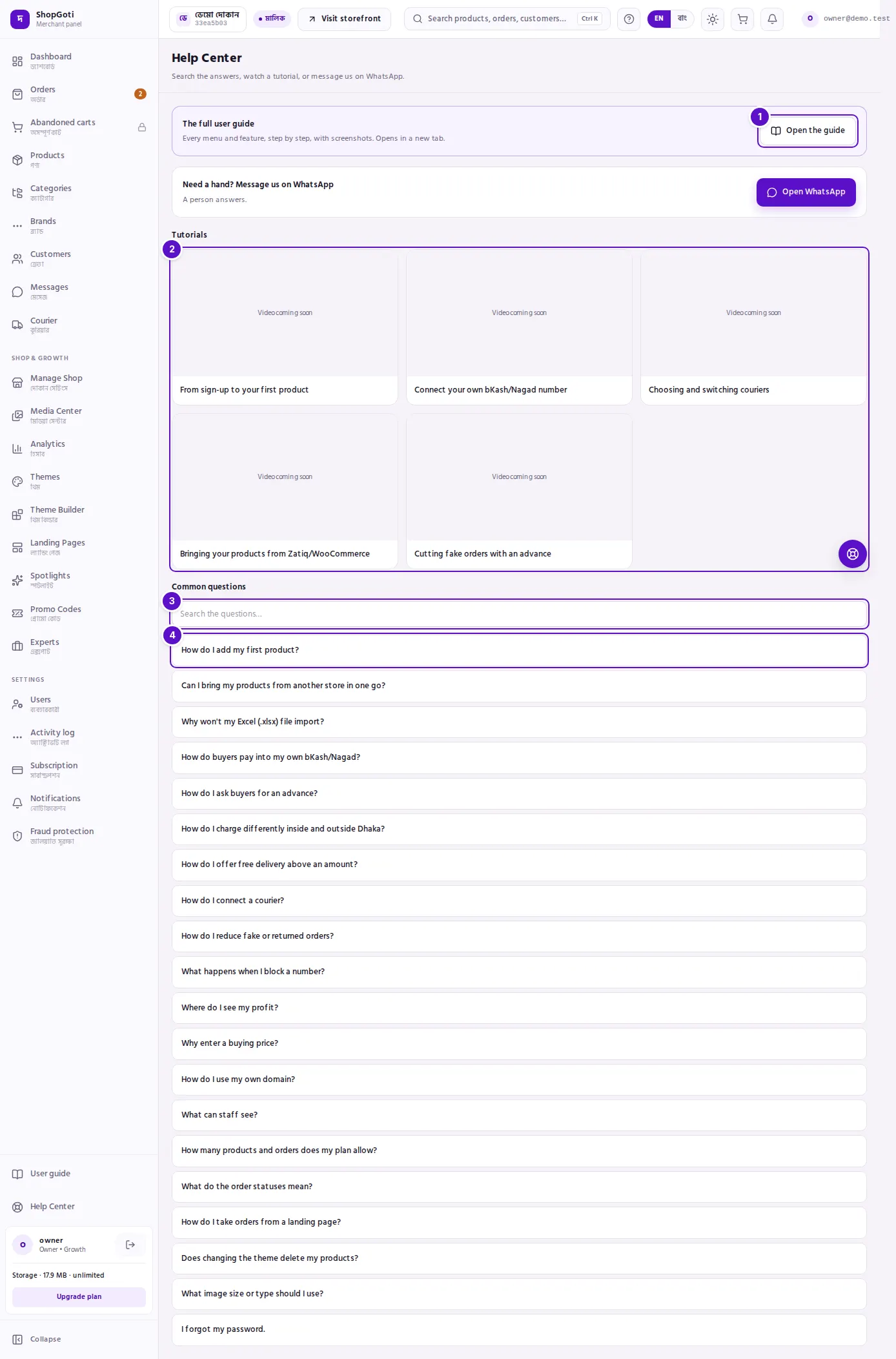
- The full user guide card — Open the guide opens the guide in a new tab.
- Tutorials — the video frames. A frame with no video yet says Video coming soon.
- Search the questions box — above the Common questions list. The list gets shorter as you type.
- Common questions — press a question to open its answer underneath.
When ShopGoti has set a WhatsApp number, a WhatsApp card appears under the guide card. If no number is set, that card does not appear.
Steps
Open the full guide
Steps
- In the left menu, press User guide at the foot, or press Open the guide on the card at the top of this page.
- The guide opens in a new tab. Pick the menu you have a question about from the list on the left.
Find an answer
Steps
- In Common questions, type a word that matches your problem into Search the questions.
- The list gets shorter as you type. If nothing matches, the page says: "Nothing found — try other words, or ask us on WhatsApp."
- Press the question you need. The answer opens underneath it; press the question again to close it.
Watch a tutorial
Steps
- Under Tutorials, press the frame of the video you want.
- The video plays on this page. It does not open a new tab.
- A frame that says Video coming soon has no video yet. There is nothing to open.
Message us on WhatsApp
Steps
- On the Need a hand? Message us on WhatsApp card, press Open WhatsApp.
- WhatsApp opens in a new tab with this message ready: "Hello, I need help with ShopGoti." Change it before you send if you want.
- If the card has an Hours line, the hours are written there. If it does not, the card says only: "A person answers."
Tips and common mistakes
- The "?" in the top bar does not open this page. It opens the guide for the screen you are on — for example, the Orders list chapter on the Orders page. See Top bar.
- There is no link to this page on a phone. A phone shows no left menu. On a phone, press More in the bottom bar, then User guide to read the guide. See Using the panel on a phone.
- A missing video is not an error. Some tutorial frames are still waiting for their video.
- Found a mistake in the guide? Tell us from the Help Center — use the WhatsApp card if it is there.
Related pages
- Start here: panel tour — the menu, the top bar and the phone bar at a glance
- Your account card — the card at the foot of the menu, the storage meter, Log out
- Common problems and messages — what the messages mean