10.7Order Limits
Set your order-number prefix, choose how the checkout is laid out and whether buyers must confirm an OTP, and understand that the OTP setting is saved but not yet enforced.
- Menu:
- Manage Shop
- Who:
- Owner · Manager
- Package:
- All packages
- Updated:
- 2026-10-26
Overview
Order Limits holds your Order numbers setting and two checkout settings: the Checkout style (one page or step by step) and the Require a buyer OTP at checkout switch.
Every order gets a number like LS-1001: your shop's prefix, a hyphen, and a count that starts at 1001. The buyer sees it in their SMS, on the invoice and on the courier parcel. Until you choose a prefix, it is taken from your shop name (for example, Rahim Fashion House gives RFH).
This page does not set a maximum order amount or a maximum quantity.
Owners and Managers can change them. Staff are sent to the dashboard.
Read this before you rely on the OTP. The OTP switch is saved, but it is not enforced at checkout yet. A ticked box does not protect your checkout today. The page shows a note to say so whenever the switch is on.
Screen tour
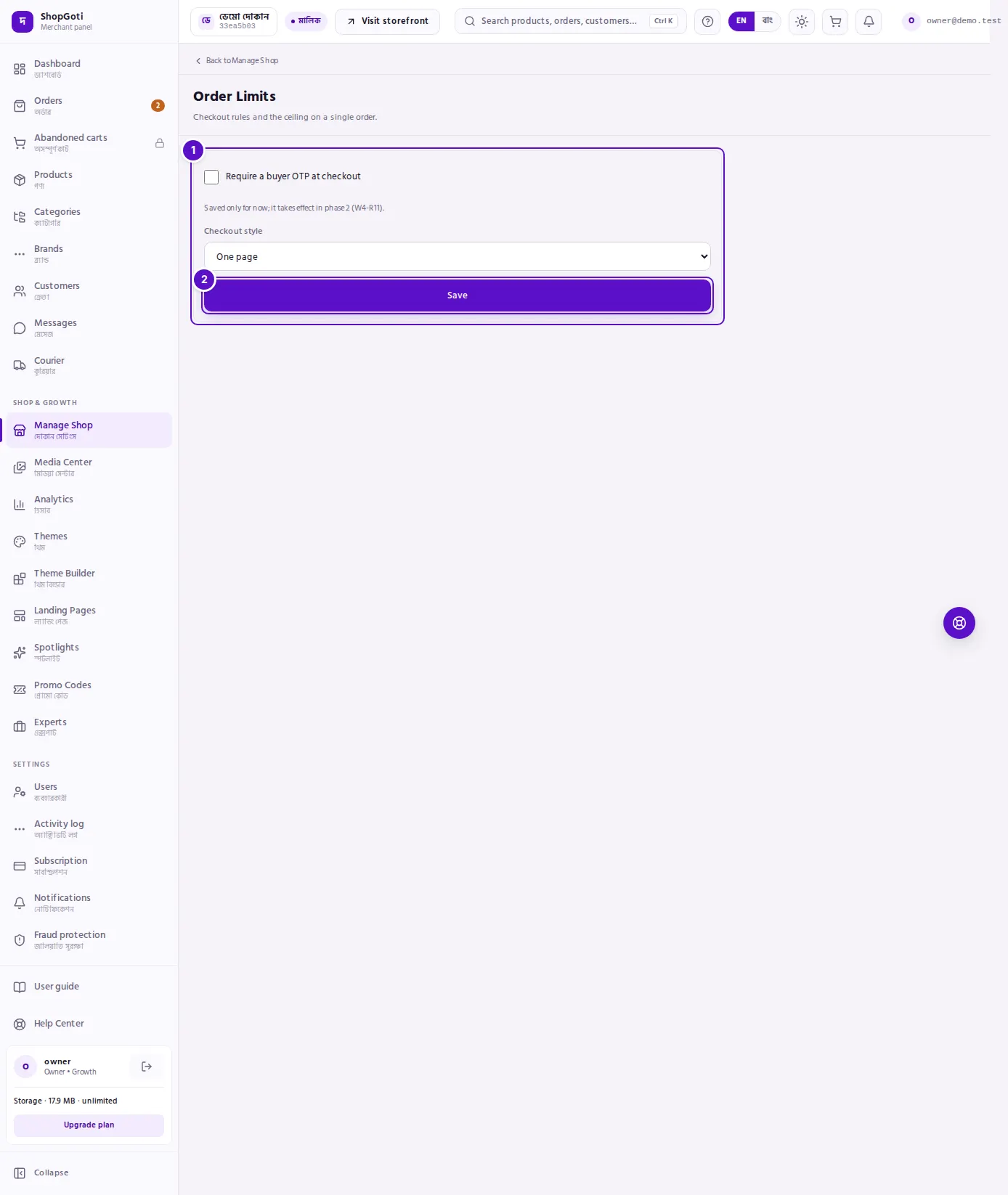
- The two settings — the Require a buyer OTP at checkout tick box, with a note under it that says the setting is saved for now and takes effect later, and the Checkout style choice, One page or Step by step. When the OTP switch is on, a note also appears on the page.
- Save — saves both settings.
Steps
Set your order number prefix
Steps
- Under Order numbers, type a Prefix of 2–5 English letters or digits, starting with a letter — your shop's initials work well.
- Check Next order number. It changes as you type.
- Press Save. The new prefix applies from the next order.
Change the checkout style
Steps
- Under Checkout style, choose One page or Step by step.
- Press Save.
Turn on the buyer OTP
Steps
- Tick Require a buyer OTP at checkout.
- Read the note under the box: "Saved only for now; it takes effect in phase 2 (W4-R11)."
- Press Save. A note then appears on the page: "Buyer OTP is saved but not enforced at checkout yet (Phase 2 — W4-R11)."
Fields
| Field | Required | What it does |
|---|---|---|
| Prefix | Yes (taken from your shop name) | The letters before the hyphen in every new order number. 2–5 English letters or digits, starting with a letter. |
| Require a buyer OTP at checkout | No | A tick box. It is saved, but checkout does not enforce it yet. |
| Checkout style | Yes (preselected) | One page shows the whole checkout on one screen. Step by step shows it in stages. |
Tips and common mistakes
- Earlier orders keep their numbers. Changing the prefix does not rename orders you already have, and the count carries on — it never starts again from 1001. Orders placed before October 2026 keep their old six-digit number, such as 000042.
- Buyers can type the number any way. On the track-order page,
LS-1001,ls1001and just1001all find the same order. A guest buyer gives the order number and the phone number together; a buyer who is signed in to their account needs only one of them, and a phone number alone lists their orders placed with it. - Do not count on the OTP. Until the setting is enforced, buyers are not asked for an OTP at checkout, even with the box ticked.
- The note names an internal reference (W4-R11). The page shows it as written. It is the team's own tracking code for this change.
- No order maximum here. If you want to limit how many items or how much a buyer can order, this page does not do that.