23.4Check a buyer
Before you take an order, check a buyer by phone number, order amount and district while the buyer is still on the phone, and see whether to take it.
- Menu:
- Fraud protection
- Who:
- Owner · Manager · Staff
- Package:
- All packages
- Updated:
- 2026-10-15
Overview
The Check a buyer tab lets you enter a buyer's phone number, the order amount and the district, and see whether you should take the order. Do this before you take the order, while the buyer is still on the phone. With cash on delivery, a risk warning that arrives after the parcel has gone out costs you the goods and the delivery.
The check changes nothing. It does not create an order, hold an order, or block the buyer. It only shows you a result.
Everyone (Owner, Manager and Staff) can use this tab.
Screen tour
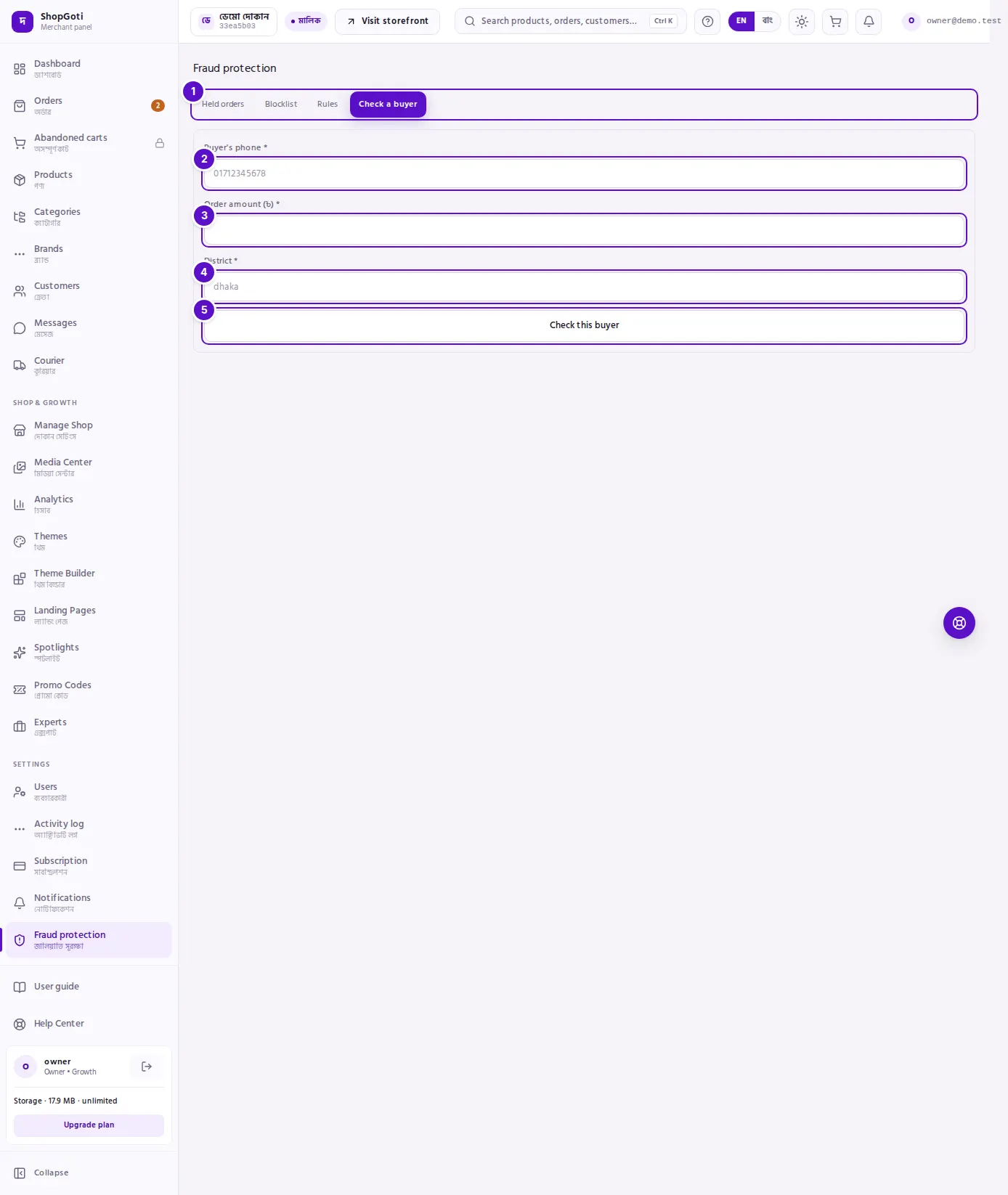
- Fraud protection tabs — check that the Check a buyer tab is open.
- Buyer's phone — the buyer's mobile number, for example
01712345678. - Order amount (৳) — the total of the order you are about to take.
- District — the buyer's district.
- Check this buyer — starts the check. The result appears under the button.
Steps
Check a buyer
Steps
- Open Fraud protection from the menu and press the Check a buyer tab.
- In Buyer's phone, type the buyer's number.
- In Order amount (৳), type the total of the order, for example
1500. - In District, type the district. The panel sends the district in lower case, so capital letters do not matter.
- Press Check this buyer. While the check runs, the button says "Checking…".
- Read the result under the button. It is one of two boxes:
- Red box: "This order should not be taken" — do not take this order.
- Yellow box: "Proceed carefully — the order will be held" — the order will be held. Talk to the buyer again before you confirm it.
- Inside either box you see the risk level and the rule codes that matched. The rule codes stay in English, so you can read them out to support.
Fields
All three boxes are required.
| Field | Required | What to type |
|---|---|---|
| Buyer's phone | Yes | The mobile number, for example 01712345678 |
| Order amount (৳) | Yes | The total of the order you are about to take. Zero or more |
| District | Yes | The name of the district |
Tips and common mistakes
- Check before you take the order. Do it while the buyer is still on the phone. After the parcel has gone out, the cost is yours.
- The check changes nothing. The decision to take or refuse the order is yours. Nothing is created, held or blocked from this tab.
- Red and yellow are different. Red means do not take the order. Yellow means the order will be held, so proceed carefully.
- "Phone number does not look valid." Type the number again and check it.
- "Enter a phone, an amount and a district." One of the three boxes is empty. Fill in all three.
- "Could not check that buyer right now." The check failed. Try again after a moment.
Related pages
- Held orders — the orders that were held or refused, and why
- Blocklist — blocked phone numbers and emails
- Rules — the limits that decide when an order is held
- Orders list — all orders, by status and payment