3.1Abandoned carts — call list and add-on
The buyers who left items in their cart without ordering, as a call list; with the recovery add-on, the contact history, logged outcomes, reminders and the recovery numbers.
- Menu:
- Abandoned carts
- Who:
- Owner · Manager · Staff
- Package:
- Depends on the package — a lock on the menu means upgrade
- Updated:
- 2026-10-15
Overview
The Abandoned carts page lists the buyers who gave their name and details but did not finish the order. Each buyer is one row. The row shows the value of the cart, and one tap calls or messages the buyer on WhatsApp. To see what to talk about, press Details.
The page has two versions:
- Free call list — on every shop. It is only a list to phone from: the buyer, the items, the total, and the call and WhatsApp buttons.
- Abandoned cart recovery add-on — when the shop has this add-on, the same page also shows the contact history, a form to log what happened on each call, a reminder to call again, status tabs, and the numbers that show how much the calls brought back.
Owners, Managers and Staff can all open this page and use it. If the add-on is bought but the page still looks like the free list, reload the page. When the panel cannot confirm the add-on, it shows the free list.
Screen tour
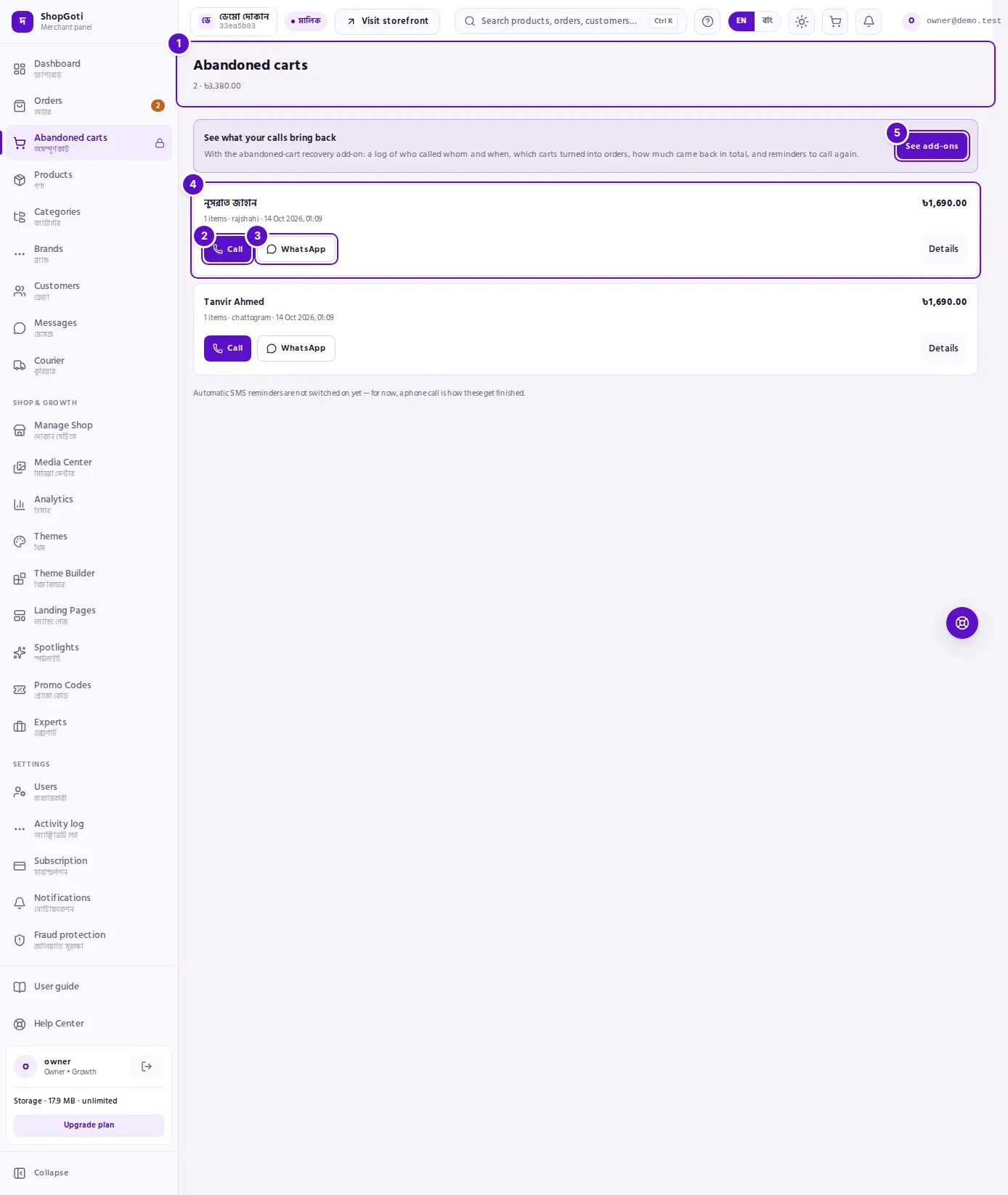
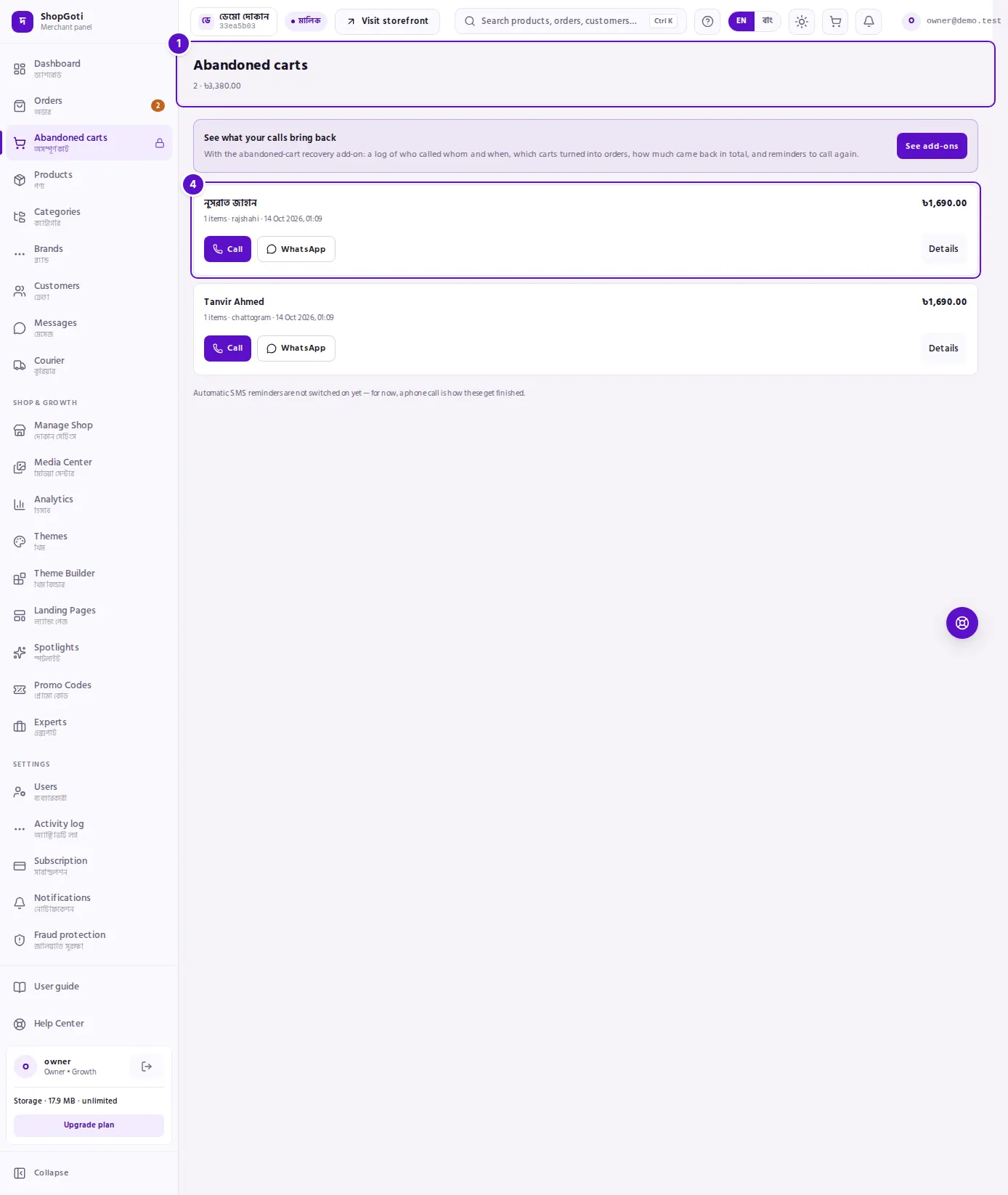
- Title and totals — the page name, with the number of buyers and the total value of their carts beside it. With no buyers, only the name shows.
- Call — starts a phone call to the buyer's number.
- WhatsApp — opens WhatsApp with a message already written.
- Buyer row — the name, status, district, when the cart was left, the number of items, and the cart value on the right. The Details button is at the end of the row.
- Add-on card — "See what your calls bring back". See add-ons opens the Subscription page. This card appears only on the free list.
- Title and totals — how many leads there are, and the value of the carts that can still be recovered.
- Number cards — four cards: Still recoverable, Recovered by you, Recovery rate, and Due to call. Pressing Due to call opens only that tab.
- Status tabs — All, Due to call, Open, Contacted, Recovered, Came back alone, Lost. Each tab shows a count.
- Buyer row — the status badge, the Due to call badge when a reminder has come, and the cart value. Pressing the row opens the basket and the contact history.
Steps
Call a buyer
Steps
- Open Abandoned carts from the menu. The free list is sorted by cart value, the largest first.
- Press Call on the buyer's row. A call starts on your phone.
- To see what is in the cart before you talk, press Details at the end of the row. A panel opens from the bottom with the buyer's name, number, Last seen time, and the In the basket list.
- When the call ends, close the panel. Without the add-on there is nothing more to record.
Send a WhatsApp message
Steps
- Press WhatsApp on the buyer's row. WhatsApp opens in a new tab with a message already written.
- Read the message. Change it if you want, then send it.
See what is in the basket
Steps
- Press Details on the buyer's row.
- In In the basket, check each item's name, quantity and unit price. If the price has changed, Price changed is shown. If the item is not available, Unavailable is shown. If the product no longer exists, Product no longer exists is shown.
- If the buyer has ordered after leaving the cart, a green box shows Ordered, with the amount and the date. Press View order to open that order.
See the contact history (add-on)
Steps
- Press Details on the buyer's row.
- In Contact history, read each entry: what happened, how it was done, who did it (You or A teammate), when, and any reminder time and note.
- If nobody has contacted the buyer yet, the panel says "Nobody has contacted this buyer yet."
Log the outcome of a call (add-on)
This form is only in the add-on. Log the result of every call, so that Recovered by you stays correct.
Steps
- Press Details on the buyer's row. The Log the outcome form is at the bottom of the panel.
- Under What happened, choose one option. The default is No answer.
- Under How, choose Call, WhatsApp or SMS. The default is Call.
- Under Remind me, choose a time. The default is No reminder. In 2 hours means two hours from now. Tomorrow morning means 10:00 the next day, Dhaka time. In 3 days means 10:00 three days from today, Dhaka time.
- If you want, type a note in Note (optional). The limit is 500 characters.
- Press Save. The panel shows "Saved." and closes, and the new entry appears in the history.
Filter by status (add-on)
Steps
- Press one of the status tabs above the list.
- Press Due to call to see only the buyers whose reminder time has come.
- Press All to see every buyer again.
- If there is a Show more link at the bottom of the list, press it to load more buyers.
Fields
The logging form has four fields. The free list does not have this form.
| Field | What you choose or type | Default |
|---|---|---|
| What happened | No answer, Call back later, Will order, Not interested, Wrong number | No answer |
| How | Call, WhatsApp, SMS | Call |
| Remind me | No reminder, In 2 hours, Tomorrow morning, In 3 days | No reminder |
| Note (optional) | Free text, up to 500 characters | Empty |
Tips and common mistakes
- Free and add-on are different. The free list has no tabs, number cards, history or logging form. It only gives you the phone number and the basket, so you know what to talk about.
- A call that is not logged does not count. Recovered by you counts an order only when you or your team contacted the buyer and the order came within the number of days shown at the foot of the page. An order with no contact counts as Came back alone. Only storefront carts are counted.
- There are no automatic SMS reminders yet. The reminder you set is for you: it tells you when to call again. Nothing is sent to the buyer on its own. The page says this too.
- One buyer, several carts. A buyer with more than one cart appears once. The line "+N earlier carts" means those carts belong to the same buyer.
- Prices and stock can change. If the basket says Price changed, check today's price before you quote it. If it says Unavailable or Product no longer exists, do not promise that item.
- Recovered, Came back alone and Lost buyers have no Call, WhatsApp or logging form, because there is nothing left to follow up.
- Nothing loads. If the page says "The history could not be loaded just now", the number cards, the tabs and the history are hidden. Open the page again after a moment.
Related pages
- Dashboard — the summary of new and on-hold orders
- Orders list — orders that came back after a cart was left
- Held orders — check a buyer's risk before you take an order